
If your frame rates are stuttering despite a capable GPU, your RAM might be the bottleneck. RAM affects gaming performance more than most guides admit — not just through raw capacity, but through speed, timings, and whether you’ve enabled XMP/EXPO profiles. Here’s a practical breakdown of how to upgrade RAM for gaming and which kits are actually worth buying in 2026.
Why RAM Matters More Than You Think
Modern games are increasingly CPU-bound at high frame rates, and your CPU’s performance is directly tied to memory bandwidth and latency. Running DDR5-4800 instead of DDR5-6400 can cost you 8–15% of your FPS ceiling in titles like Call of Duty: Black Ops 6, Cyberpunk 2077, and Microsoft Flight Simulator 2024.
Two things matter most:
- Speed (MHz): Higher frequency = more data throughput per second
- Timings (CL): Lower CAS latency = faster response time between CPU and RAM
A DDR5-6400 CL32 kit beats a DDR5-6000 CL30 kit in most gaming workloads. The bandwidth gain outweighs the minor latency difference.
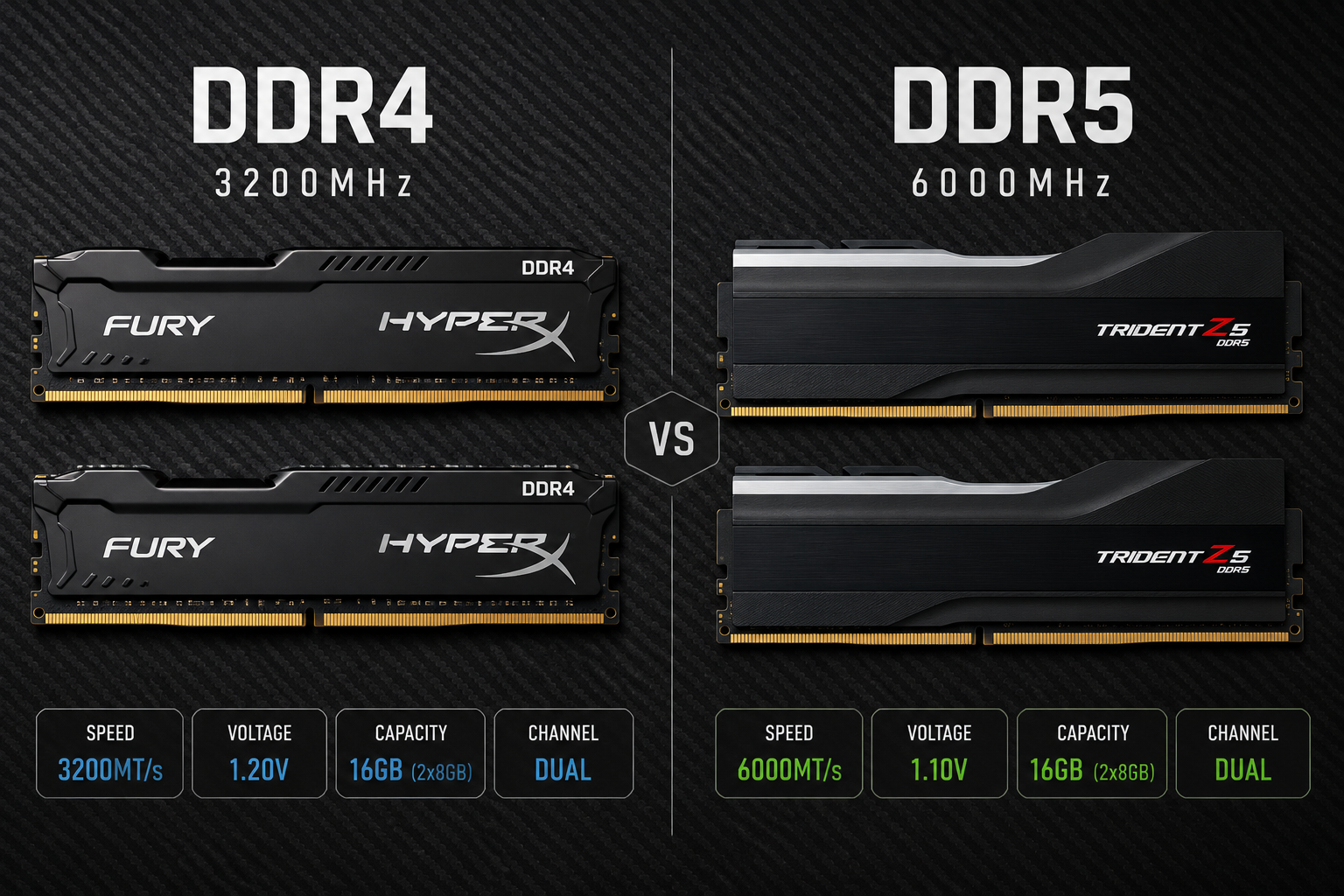
DDR4 vs DDR5: Which Platform Are You On?
Before buying anything, confirm your motherboard’s socket. Intel’s LGA1700 (12th/13th gen) and LGA1851 (Arrow Lake) support DDR5. AMD’s AM5 platform is DDR5 only. AM4 (Ryzen 5000 and older) uses DDR4.
| Platform | Socket | RAM Type |
|---|---|---|
| Intel 13th/14th Gen | LGA1700 | DDR4 or DDR5 |
| Intel Arrow Lake | LGA1851 | DDR5 only |
| AMD Ryzen 7000/9000 | AM5 | DDR5 only |
| AMD Ryzen 5000 | AM4 | DDR4 only |
You cannot mix types — DDR5 won’t physically fit a DDR4 slot.
Always Enable XMP or EXPO First
Before spending money, check your current RAM profile. Most kits ship running at JEDEC baseline speeds (DDR5-4800 or DDR4-2133) even if the kit is rated for much higher.
How to enable XMP/EXPO:
- Restart and enter BIOS (usually Del or F2 on boot)
- Navigate to AI Tweaker, DOCP, or Memory settings (varies by board)
- Select XMP Profile 1 (Intel) or EXPO Profile 1 (AMD)
- Save and exit
This one change alone can recover 10–20% FPS in CPU-limited scenarios — completely free.
Benchmark your FPS before and after any RAM change.
Use the built-in benchmark at https://fpscalculator.net/games to get a baseline FPS estimate for your current hardware and see how much headroom a RAM upgrade gives you.
How Much RAM Do You Need?
16GB (2×8GB): Still the minimum for competitive gaming in 2026. Playable in most titles, but expect stutters in open-world games like Starfield or Hogwarts Legacy.
32GB (2×16GB): The current sweet spot. Covers all modern titles, leaves room for browser tabs and Discord, and future-proofs you through the rest of this hardware generation.
64GB (2×32GB): Overkill for pure gaming. Worth it only if you stream, run VMs, or use content creation software simultaneously.
Always buy in dual-channel kits (two sticks). Two 16GB sticks in a dual-channel configuration consistently outperforms a single 32GB stick by 10–20% in games.
Best DDR5 Kits for Gaming in 2026
Budget: DDR5-6000 CL36 (~$70–$90 for 32GB)
Corsair Vengeance DDR5-6000 CL36 32GB
- Speed: 6000 MT/s
- Timings: 36-36-36-76
- Voltage: 1.35V
- XMP 3.0 / EXPO compatible
- Expected FPS gain vs DDR5-4800: +8–12% in CPU-limited titles
This is the best RAM for gaming at entry-level DDR5 pricing. The 6000 MT/s sweet spot is specifically optimized for AMD’s Infinity Fabric on AM5 platforms (which runs best at DDR5-6000 with 1:1 FCLK ratio at 3000 MHz).
Mid-Range: DDR5-6400 CL32 (~$110–$140 for 32GB)
G.Skill Trident Z5 Neo DDR5-6400 CL32 32GB (AMD EXPO)
- Speed: 6400 MT/s
- Timings: 32-39-39-102
- Voltage: 1.40V
- Designed and validated for AM5 platforms
Kingston Fury Beast DDR5-6400 CL32 32GB
- Speed: 6400 MT/s
- Timings: 32-39-39-96
- Voltage: 1.35V
- Intel XMP 3.0 validated
Both kits deliver around 15% better gaming throughput than baseline DDR5-4800 and are the best RAM for gaming in the mainstream price bracket.
High-End: DDR5-7200+ CL34 (~$180–$250 for 32GB)
G.Skill Trident Z5 RGB DDR5-7200 CL34 32GB
- Speed: 7200 MT/s
- Timings: 34-45-45-115
- Voltage: 1.45V
- Requires a Z790 or X670E board with strong memory trace layout
Gains here are real but diminishing — expect 5–8% over DDR5-6400 kits in most games. Worthwhile if you’re pairing it with a Ryzen 9 9950X or Core Ultra 9 285K where every frame counts.
Best DDR4 Kits for Gaming in 2026
DDR4 platforms are mature, and the price-to-performance ratio is excellent.
Budget: DDR4-3200 CL16 (~$40–$55 for 32GB)
Corsair Vengeance LPX DDR4-3200 CL16 32GB
- Timings: 16-20-20-38
- Voltage: 1.35V
- Near-universal compatibility with AM4 and LGA1700
If you’re on Ryzen 5000 or 12th/13th Gen Intel and haven’t enabled XMP yet, this kit running at its rated speed will feel like a significant upgrade from a stuck-at-2133 system.
Mid-Range: DDR4-3600 CL16 (~$60–$80 for 32GB)
G.Skill Ripjaws V DDR4-3600 CL16 32GB
- Timings: 16-19-19-39
- Voltage: 1.35V
- The sweet spot for Ryzen 5000 (matches 1800 MHz FCLK 1:1 ratio)
This is the best RAM for gaming on AM4 — full stop. DDR4-3600 CL16 is where AMD’s Infinity Fabric runs at its most efficient frequency, and the performance gap over DDR4-3200 is measurable in nearly every title.
High-End: DDR4-4000+ CL16–18 (~$100–$130 for 32GB)
Teamgroup T-Force Xtreem ARGB DDR4-4000 CL18 32GB
- Timings: 18-22-22-42
- Voltage: 1.45V
- Requires BIOS tuning; not plug-and-play
At this tier, you’re pushing Ryzen 5000’s FCLK into 2:1 territory (FCLK 2000 MHz with UCLK 4000), which actually increases latency. For most users, DDR4-3600 CL16 outperforms DDR4-4000 on AM4. Stick to 3600 CL16 unless you enjoy BIOS tuning.
FPS Expectations by Tier
The table below reflects 1080p averages across a range of competitive and open-world titles with a mid-range GPU (RTX 4070 / RX 7700 XT class):
| RAM Tier | Example Kit | Avg FPS Gain vs Baseline |
|---|---|---|
| Baseline (JEDEC) | Any DDR5-4800 / DDR4-2133 | 0% (reference) |
| Budget DDR4 | DDR4-3200 CL16 | +12–18% |
| Sweet-spot DDR4 | DDR4-3600 CL16 | +18–25% |
| Budget DDR5 | DDR5-6000 CL36 | +10–20% over DDR5 baseline |
| Mid DDR5 | DDR5-6400 CL32 | +15–25% over DDR5 baseline |
| High-end DDR5 | DDR5-7200 CL34 | +20–30% over DDR5 baseline |
Gains are most visible at 1080p where CPU throughput is the limiting factor. At 4K, GPU bottleneck dominates and RAM differences shrink significantly.
Installation Tips
- Slot placement matters. On most motherboards, dual-channel pairs go in slots 2 and 4 (not 1 and 2). Check your motherboard manual — wrong slots cut bandwidth in half.
- Seat the sticks fully. Both latching clips should click closed. A partially seated stick is a common cause of boot failures.
- Clear CMOS if you can’t POST. If new RAM causes boot loops, pull the CMOS battery for 30 seconds or use the CLR_CMOS jumper on your board.
- Test with MemTest86. Run at least one pass after installing new RAM to rule out defective sticks before blaming other hardware.
Bottom Line
For AMD AM5 or Intel 13th/14th Gen DDR5 systems, the G.Skill Trident Z5 Neo DDR5-6400 CL32 or Corsair Vengeance DDR5-6000 CL36 are the best RAM for gaming without overspending. For AM4, the G.Skill Ripjaws V DDR4-3600 CL16 remains the definitive pick.
Whatever you buy, always enable XMP or EXPO in BIOS — that single setting often delivers more FPS than the hardware upgrade itself.
See how your current or target RAM affects your in-game FPS.
Plug your build specs into the calculator at https://fpscalculator.net/games to get real estimated frame rates based on your specific hardware combination.